Sleep, wake and battery audit · Windows

WakeAuditIQ
Find out why your PC woke up in the night, what stops it sleeping, and where the battery went, in plain language.
WakeAuditIQ for Windows
Available on Microsoft Store
One-time purchase in the Microsoft Store. No subscription and no in-app purchases.
Requires Windows 10 (version 1809) or later.
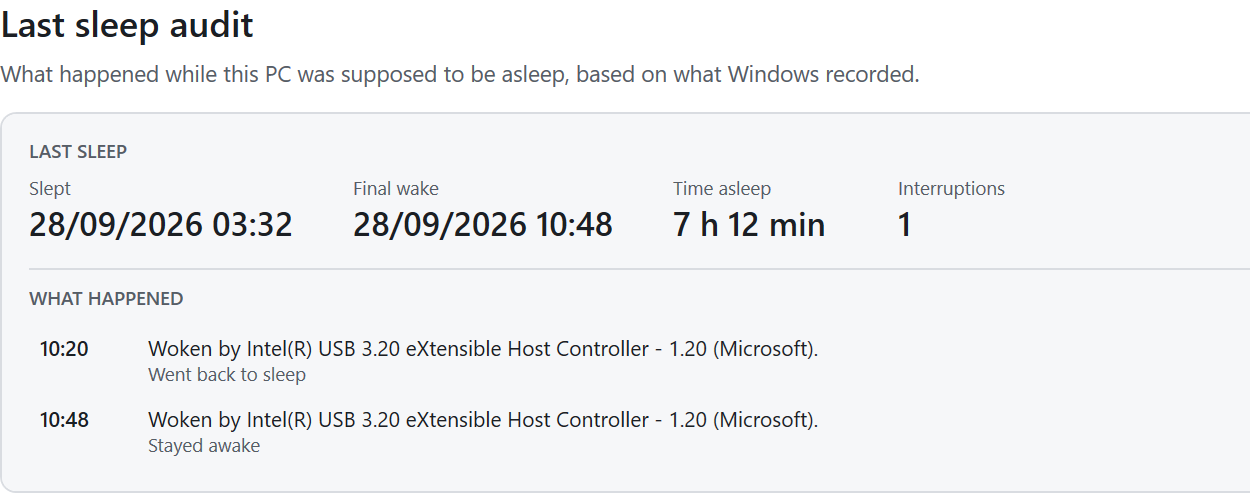
What it tells you
- What woke it
- The device, wake timer or scheduled task Windows recorded for each wake, and whether the same cause keeps repeating.
- Why it won’t sleep
- Power-plan settings that stop sleep, and, with the optional admin check, programs and drivers blocking it right now.
- What can wake it
- Devices allowed to wake the PC, wake timers and scheduled tasks that can wake it.
- Battery while asleep
- On a laptop, how much battery was used during sleep or Modern Standby.
Each finding says where it came from, such as a Windows event or a power setting, and what you can do about it. Everything it reads is already recorded by Windows.
How you use it
- Step 1
Run an audit
No administrator rights needed for the main audit.
- Step 2
Read what happened
The last sleep, each wake and its cause, and anything that keeps the PC awake.
- Step 3
Fix it yourself
It opens the right Windows setting, Device Manager or Task Scheduler. Advanced commands are shown as text, never run for you.
Privacy
WakeAuditIQ works on your PC and reads only power-related information. It has no account, analytics or telemetry, and it sends nothing anywhere. An exported report leaves out user names and device IDs, and you decide whether to share it.
Before you buy
- It reports; it does not change anything. Suggested commands are shown as text for you to run yourself.
- Some details (programs blocking sleep, active wake timers, every wake task) need the optional admin check, which asks for Windows permission once.
- It explains what Windows recorded. If Windows did not log a wake source, it cannot name one.
- Laptop battery and Modern Standby results are tested with recorded data, not yet on a wide range of laptops.
Questions
Will it stop my PC waking up?
It finds the cause and shows you where to change it. It does not change settings itself.
Does it work on desktops and laptops?
Yes. On a desktop there is no battery section; on a laptop it also shows battery used while asleep.
Get WakeAuditIQ
WakeAuditIQ for Windows
Available on Microsoft Store
One-time purchase in the Microsoft Store. No subscription and no in-app purchases.
Requires Windows 10 (version 1809) or later.
Need help? WakeAuditIQ support