Speaker and microphone level guard · Windows

AmporIQ
When Windows, a driver or a call app changes your speaker or microphone level, AmporIQ puts it back to the rule you set.
AmporIQ for Windows
Available on Microsoft Store
One-time purchase in the Microsoft Store. No subscription and no in-app purchases.
Requires Windows 10 or later.
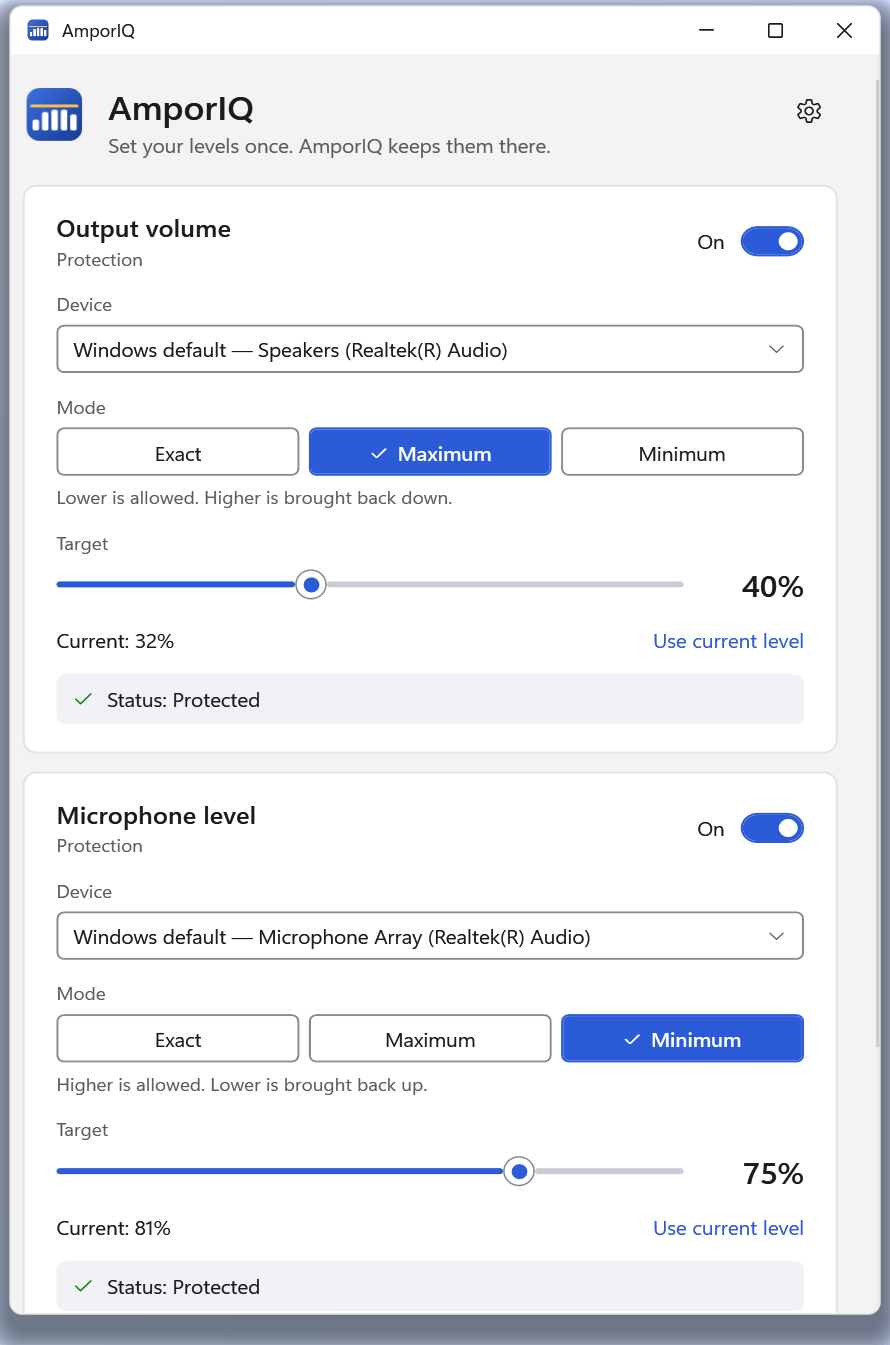
Three rules, set per device
Choose a rule and a target for your speakers, your microphone, or both.
Exact
Keep this level.
Example: Set 60%. Something moves it to 45% or 80%: it goes back to 60%.
Maximum
Lower is fine; never louder.
Example: Set 40%. You turn it down to 32%: left alone. Something raises it to 100%: brought back to 40%.
Minimum
Higher is fine; never quieter.
Example: Set 75% for your microphone. A call app drops it to 30%: raised back to 75%. You raise it to 81%: left alone.
How it works
AmporIQ sits in the system tray. Windows tells it when a device's level changes; if the new level breaks your rule, AmporIQ sets it back. It reacts to those notifications rather than constantly checking.
It can follow whichever device is the Windows default, or guard one specific device and pick up again when that device is reconnected.
An optional setting keeps a slow-to-wake USB DAC or speaker active by playing digital silence. Whether that helps depends on the device and driver.
What it controls, and what it doesn't
AmporIQ changes the Windows level setting for a device: the same number as the volume slider. It does not touch the sound itself.
So it won't compress a loud film scene, limit a sudden peak inside a game, or protect your hearing. It never records or listens to your microphone.
Privacy
No account, no telemetry and no networking code of its own. The only connection is the Microsoft Store's standard licence check, and AmporIQ keeps working if that check can't be made.
Before you buy
- It controls the Windows level setting for a device. It does not process, compress or limit the sound itself.
- It corrects the level after Windows reports a change, so a very brief jump may still be audible.
- It is not hearing protection, and it cannot tame a loud sound inside a recording or stream.
- For the default device it follows the Windows default for media and apps, not the separate communications default.
Questions
Will it stop sudden loud sounds?
No. It keeps the volume setting within your rule, and corrects it after something changes it. It does not process the audio, so a loud moment inside a video or game plays at whatever level you have set.
Does it work with Bluetooth and USB headsets?
It works with any device Windows lists as an output or input with a level. It can follow the default device or wait for a specific device to reconnect.
Availability
AmporIQ for Windows
Available on Microsoft Store
One-time purchase in the Microsoft Store. No subscription and no in-app purchases.
Requires Windows 10 or later.