Pre-reset file audit · Windows

VorselunIQ
Before you reset Windows, reinstall or move to a new PC, VorselunIQ flags the files that need attention: cloud-only items, encrypted files and links that point elsewhere. It is an audit, not a backup.
VorselunIQ for Windows
Available on Microsoft Store
One-time purchase in the Microsoft Store. No subscription and no in-app purchases.
Requires Windows 10 (version 1809) or later · x64.
What it looks for
- Cloud-only files
- OneDrive and other cloud files whose content is not fully downloaded, and cloud folders it deliberately does not open so as not to trigger downloads.
- Encrypted files
- Files encrypted with Windows EFS, which need your encryption certificate to open after a reset.
- Symbolic links and junctions
- Links that point outside your folders, to a network location, or nowhere.
- Files it couldn’t read
- Access denied, unreadable, or changed while it was scanning.
Wording the app uses
Each finding comes with an explanation, why it matters for what you're about to do, and what to do next. Some of the app's own wording, quoted as text:
-
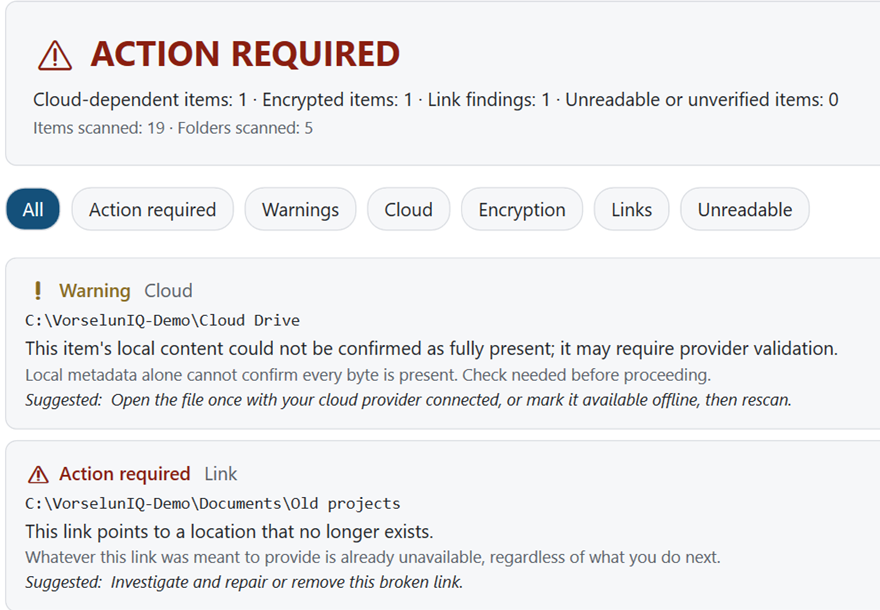
Cloud-only files
“This item is cloud-dependent — its content is not fully available locally.”
Next step: “Make this item available offline using your cloud provider, then rescan.”
-
Encrypted files
“This file is encrypted with EFS (Windows file encryption).”
-
Broken links
“This link points to a location that no longer exists.”
A scan ends with one of three results: Action required, Check needed, or No local readiness issues found. None of them means a PC is ready to be erased.
How you use it
- Step 1
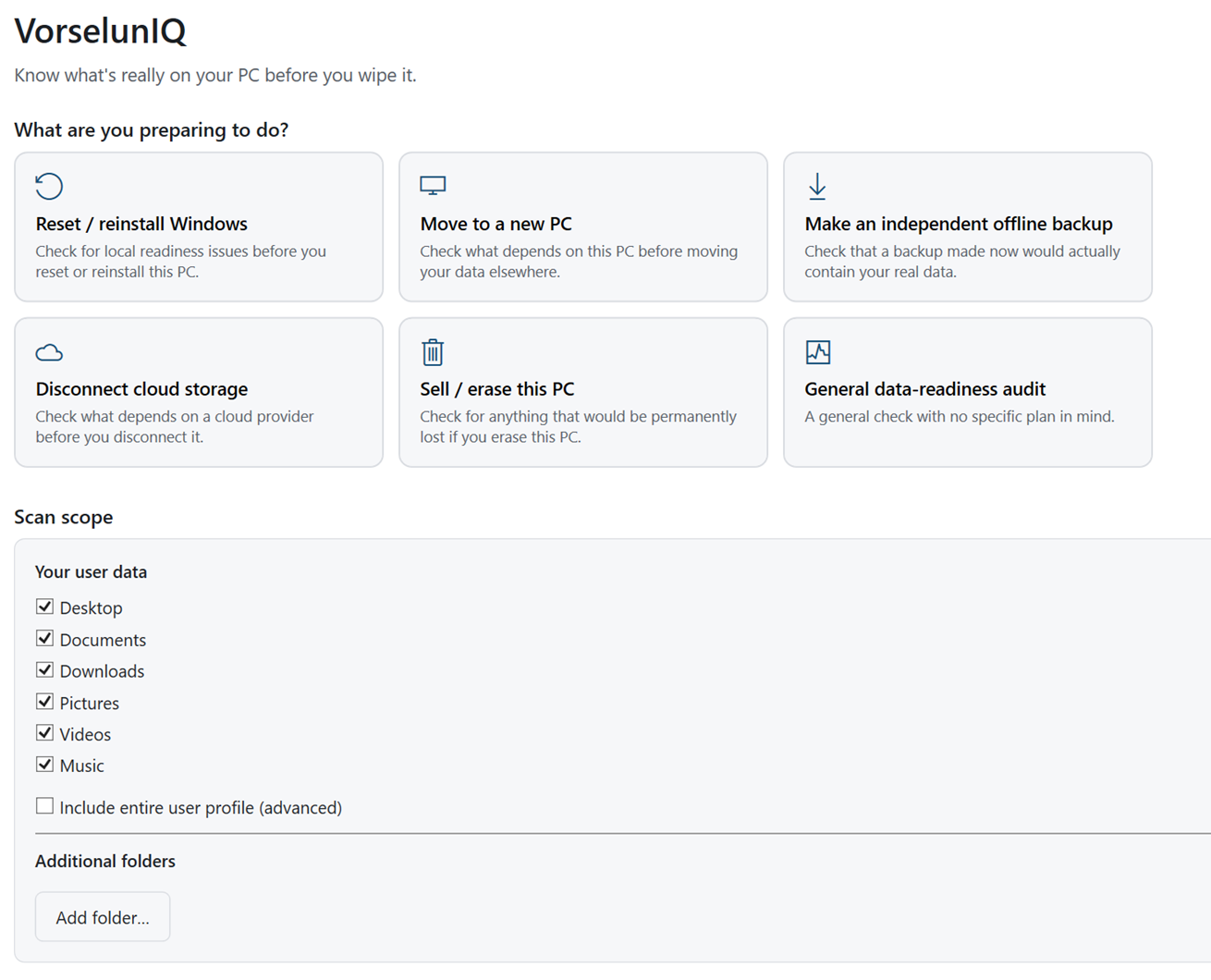
Say what you're about to do
The same file matters differently depending on the plan:
- Reset or reinstall Windows
- Move to a new PC
- Make an independent offline backup
- Disconnect cloud storage
- Sell or erase the PC
- General check
- Step 2
Scan your folders
Desktop, Documents, Downloads, Pictures, Videos and Music by default, including OneDrive locations. Add other folders if you need to. It runs without administrator rights; anything Windows won't let it read is listed as a finding.
- Step 3
Deal with the findings
Download, export or copy what needs it using your own tools, then scan again.
Privacy
The audit runs on your PC and never opens the contents of the files it checks. VorselunIQ has no networking code of its own. The only connection is the Microsoft Store's standard licence check.
Before you buy
- It is an audit, not a backup tool. It does not copy, download or repair anything.
- A result with no issues is not proof that a backup is complete or that a reset is safe.
- By default it checks your own user folders (Desktop, Documents, Downloads, Pictures, Videos, Music). You can add others; it does not scan whole drives by default.
- It never opens file contents. It looks at file state, encryption and link targets.
Questions
Does it back up my files?
No. It tells you what needs attention; making the backup, downloading cloud files or exporting certificates is up to you and your own tools.
If it finds nothing, is it safe to reset?
Not necessarily. It only checks the things listed on this page, in the folders it scanned. It cannot confirm that a backup is complete or will restore.
Availability
VorselunIQ for Windows
Available on Microsoft Store
One-time purchase in the Microsoft Store. No subscription and no in-app purchases.
Requires Windows 10 (version 1809) or later · x64.